Send your selects to Resolve without baking anything in
Culling and grading are different jobs, and the handoff between them is where footage tends to get damaged. You pick your takes somewhere convenient, and then to get them into Resolve you either re-export — which bakes a conversion into the picture and throws away the latitude you shot Log for — or you drag the originals over and re-do all your in and out points by hand.
Divecut does neither. Your picks go across as the original files, still Log, with the conversion carried as timeline information.
The conversion travels as a colour group, not as pixels
The LUT you were viewing through in Divecut is applied in Resolve as a colour group, per Log format, at the pre-clip stage. That means the clips arrive looking the way you were judging them — but nothing has been written into the image. The grade is still yours to make, from the full Log original, and the conversion is a node you can turn off, change, or replace with your own show LUT.
The checkbox says it plainly: as color groups, never baked. Every clip of the same Log format lands in one group, so changing your mind about the conversion is one adjustment rather than forty.
Your in and out points come with them
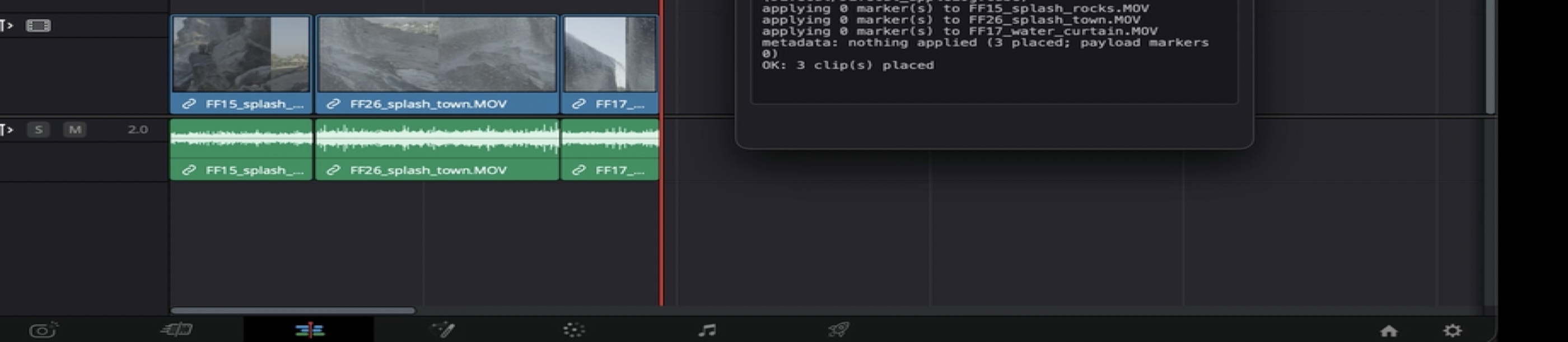
If you marked a range, the clip arrives trimmed to that range. This sounds trivial and is not — the frame accounting between an application that shows you an inclusive out point and an API that expects an exclusive one is exactly one frame, and a frame is invisible until someone checks durations against a delivery spec. We wrote about where that frame goes separately.
It talks to Resolve directly
This is not a drag and drop, and not an XML round trip. Divecut runs a small local server that Resolve's workflow integration connects to, so clips are placed through Resolve's own scripting interface: at the playhead or at the end of a track, on the track you choose. The log in the panel reports what happened — which clips were placed, which LUT was applied, whether markers and metadata came across.
The connection is local only, on an ephemeral port, with a token that has to match. Nothing about this leaves your machine.
When you do want new files
Sometimes baking in is the right answer — a proxy set, a review copy for a client who is going to watch it in QuickTime, a deliverable. That is a separate, deliberate export, where burning the conversion into the picture is a choice you make rather than a side effect of moving footage between two applications.
Keeping those two paths apart — the handoff that preserves, and the export that commits — is the part of Divecut I would argue about hardest. Everything else is convenience.
Divecut is a footage browser for macOS and iPad. It shows Log clips in the colour you shot them for, lets you search them in plain words, and hands your selects to DaVinci Resolve with the Log intact. See everything it does.